

 HashAgent Lite
 PDFTone
 DD Images
 Start Training Now
macOS · Professional
HashAgent Pro
Ten panels. One truth.
Compare files at a glance. The professional tool for comparing files across multiple panels using cryptographic hashes. Find duplicates, verify file integrity, audit backups and deployments. Export a manifest and verify it later to confirm nothing changed — all processing happens locally on your Mac.

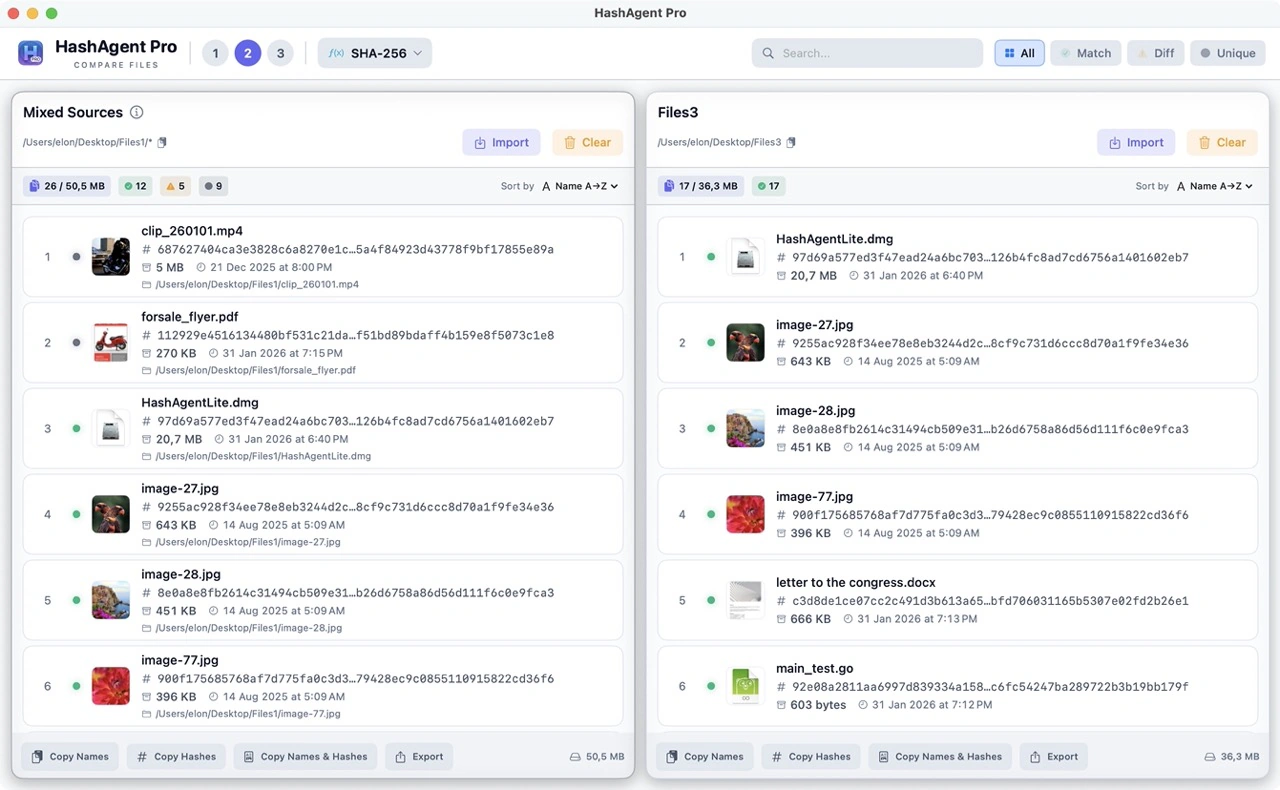
Up to 10 Panels
Compare as many sources as you need, side by side in real time, within a single window.
Manifest Verification
Export hashes today, verify tomorrow — even after the original files are gone.
100% Local
39 hash algorithms running on your Mac. No data ever leaves your computer.
Algorithms
A wide range of hash algorithms
From fast checksums to cryptographic-grade hashes — pick the one that fits your workflow.
39 hash algorithms in total. MD5 and SHA-1 are shown with a deprecation warning — still available for legacy compatibility.
Multi-Panel
Up to 10 panels — compare as many sources as you need
Load files from different locations into separate panels and compare them side by side in real time. 2–4 panels cover the majority of workflows; power users can open up to 10 panels within a single window.
Single Panel
Hash a single folder or file set. Quickly generate and export checksums for any collection of files.
Standard Comparison
Source vs. backup, three redundant copies, or a multi-branch deployment audit — the most common setup.
Power Mode
Open up to 10 panels simultaneously in one window on a wide display for large-scale audits.
Smart Filters
Focus on what matters
Four instant filters let you zero in on exactly the files you care about — no scrolling, no manual hunting.
- All
Show every file across all panels. Use as the default view when you need the full picture.
- Match
Show only files whose hashes are identical across all panels. Quickly confirm that copies are exact.
- Diff
Show files that exist in multiple panels but have different hashes — the modified or corrupted ones.
- Unique
Show files that appear in only one panel. Find what's missing on the other side of your comparison.
Manifest Verification
Verify later, even without the originals
Export file hashes from a panel as a manifest, then use it later to check what changed — even after the original files are gone.
Export a Manifest
Save hashes from any panel as a manifest in CSV, JSON, YAML, XML, hashmanifest, SHA256, or other common checksum formats.
Verification Mode
Import a manifest, link it to a folder, and HashAgent Pro re-hashes that folder and reports every file as Unchanged, Modified, Missing, or New.
Quick Verify
Skips re-hashing files whose size and modification date still match the manifest — much faster re-checks on large folders.
Long-Term Archival
A saved manifest lets you re-verify a backup or archive later, even when the original files are no longer available.
Features
Built for professionals
Every feature is designed to make large-scale file verification fast and reliable.
Drag & Drop Folders
Drop an entire folder — HashAgent Pro recursively scans all subfolders and loads every file automatically.
Instant Search
Type to filter files by name across all panels simultaneously, even in large file sets.
File Thumbnails
Images, videos, PDFs, and documents show visual previews right in the file list.
Export Results
Export hash results to CSV, JSON, XML, YAML, Parquet, or common checksum formats.
Multi-threaded Hashing
Files are hashed in parallel using all available CPU cores, with large files streamed in chunks.
100% Local
All hashing happens on your Mac using native Apple frameworks. No data ever leaves your computer.
Use Cases
When to use it
Practical scenarios where side-by-side hash comparison makes the difference.
Validate Downloads
Downloaded an installer from the web? Generate its hash and compare with the value listed on the official website to confirm it was not tampered with.
Verify File Transfers
Need to confirm a file was not changed after sending it to a client? Hash it before and after — the result should be identical.
Monitor Backups
Running nightly backups? Hash your files regularly to spot silent corruption or accidental modification early.
Compare Files
Got two similar files and not sure if they are the same? Generate a hash for each and compare the values yourself.
Software Deployment
Deployed a software update? Hash the binaries before and after to make sure nothing was modified on the server.
IT Security & Forensics
Generate and log file hashes as proof that files were not altered after collection — standard practice in security audits and forensic investigations.
Support
Need help?
Find answers to common questions or get in touch with support.
Ready to try HashAgent Pro?
Download HashAgent Pro and start comparing files with confidence.