

 HashAgent Pro
 HashAgent Lite
 PDFTone
 Start Training Now
macOS · Safari Extension
DD Images
Every image on the page. One click away.
Browse any webpage and instantly see all images in a clean gallery view. Filter by size, format, or dimensions — then download exactly what you need, one image or all at once. Native Safari Extension for macOS.
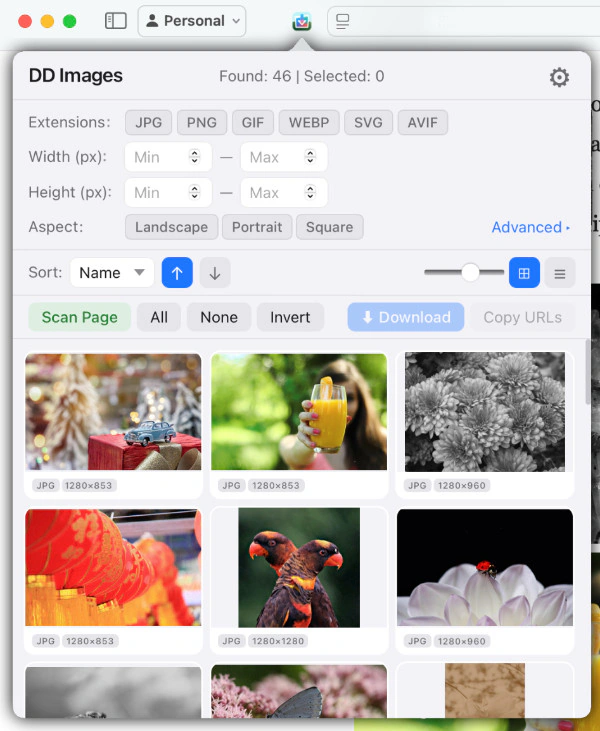
Full Page Gallery
Every image on the page in one clean gallery view.
Bulk Download
One image or all at once, saved to your Downloads folder.
100% Local
No analytics, no tracking, no external servers.
Features
Everything you need
Simple, fast, and powerful — designed to get out of your way.
Full Page Gallery
DD Images scans the entire page — <img> tags, <picture> sources, lazy-loaded data-src attributes, and CSS background images — giving you a complete gallery of every image on the page.
Smart Filters
Filter images by minimum width, height, or format (JPEG, PNG, WebP, GIF, SVG). Find exactly the image you're looking for.
Bulk Download
Select individual images or grab them all at once. Downloaded images are saved to your Downloads folder automatically.
Privacy First
DD Images collects zero data. No analytics, no tracking, no external servers. Everything runs locally — the extension only accesses the page you're already viewing.
Native macOS Extension
Built specifically for Safari on macOS using native Swift and WebExtension APIs. A true Mac citizen that respects your system.
CORS Awareness
Some websites restrict image access via CORS or hotlink protection policies.
How It Works
Three steps
Open a Page
Navigate to a webpage in Safari and click the DD Images toolbar button to open the popup.
Scan & Filter
Press the Scan button — found images appear in the gallery. Use filters to narrow down by size, format, or dimensions.
Download
Select one image or all of them. Files are saved to your Downloads folder.
Private by design.
DD Images collects zero data and only accesses the page you're already viewing.
Your data stays yoursFiles, settings and history never leave your device.
Native and lightweightBuilt natively for Apple devices.
Honest pricingFree or one-time purchase where possible.
No ads, no trackersNothing is ever sold, shared or analyzed.
Support
Need help?
Find answers to common questions or get in touch with support.
Ready to try DD Images?
Download DD Images and start grabbing images from webpages right in Safari.